Foundations
CLAUDE.md Guide: What to Put In, What to Leave Out
The five things a CLAUDE.md needs, a full worked example for a real backend service, and the three mistakes that make Claude Code ignore half of it.
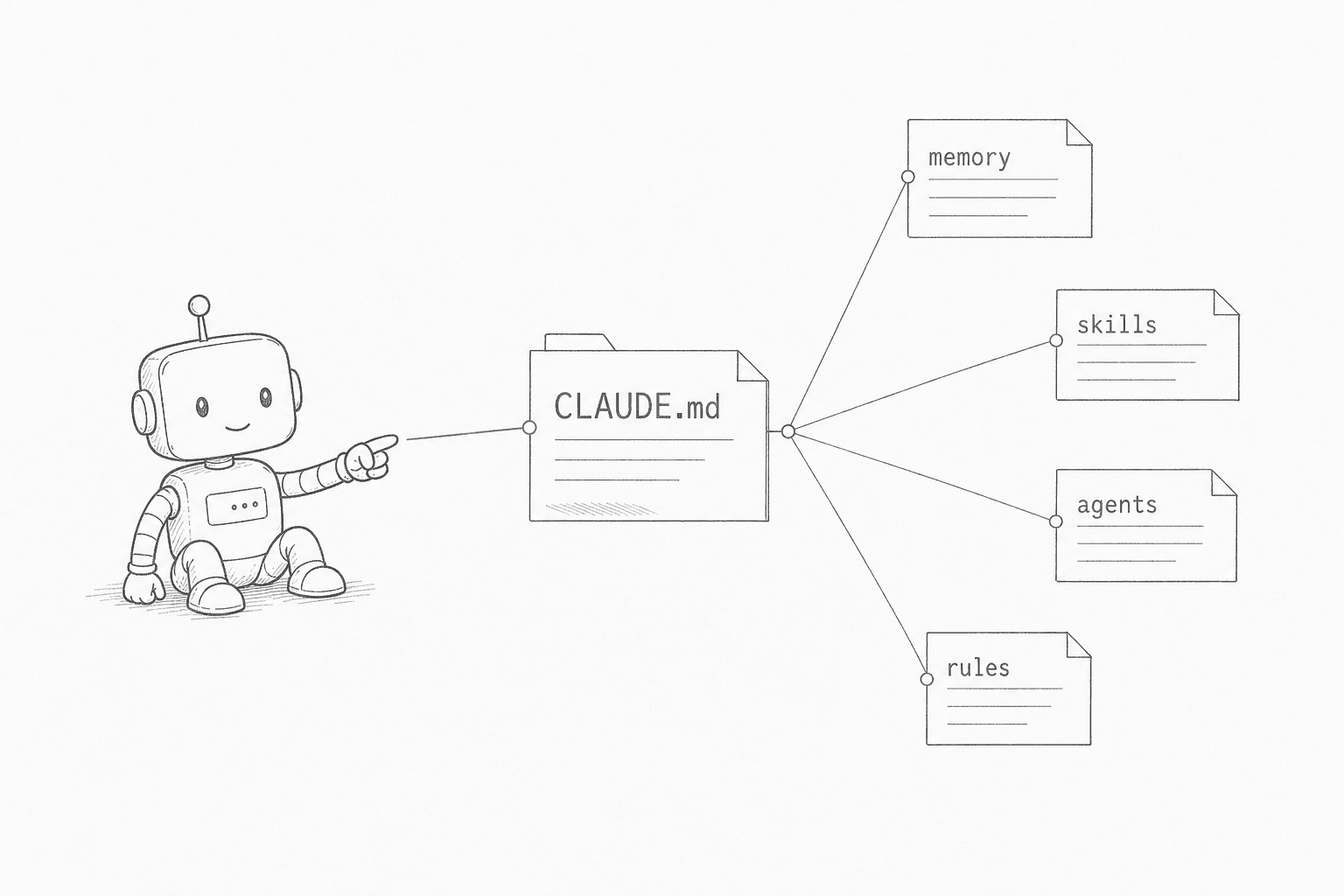
This guide is for developers setting up Claude Code on an existing project. After reading it, you'll know what to put in a CLAUDE.md, what to leave out, and how to keep it accurate as the project evolves.
The one decision this page keeps coming back to: where should context live?
| Action | Use it for | AIOS example |
|---|---|---|
| Keep in CLAUDE.md | Durable, project-wide rules that rarely change: conventions, architecture decisions, hard constraints | A router CLAUDE.md under 100 lines |
| Load from memory | Facts, history, prior decisions: retrieved when a task needs them, not always in context | Sharded per-topic memory files, read and written by cron agents |
| Delegate to a subagent | Isolated work that would bloat the main context: multi-file reads, research, test runs | A specialist agent burns its own context on the log dig |
| Summarize back | Compressing a subagent's raw output to only what the main thread needs | Standing rule: subagents return a digest, never the full transcript |
How retrieval works: the memory system. Why the always-loaded budget is scarce: the context window.
Why Most People Get Bad Results
Most people install Claude Code, type something, get a mediocre answer, and conclude "AI isn't that useful yet."
The problem isn't Claude Code. They skipped the one file that makes it work.
Without CLAUDE.md, every session starts blind. Claude Code doesn't know your stack. Doesn't know your coding style. Doesn't know your team uses Tailwind, not styled-components. Doesn't know you hate verbose output. It guesses. And guessing produces average results.
Same person. Same prompt. Night and day difference. The only variable: a CLAUDE.md file.
OK So What Is It Actually?
First, what's a .md file? It's just a text file written in Markdown: a simple way to format text using symbols like # for headings and - for bullet points. You can open it in any text editor. It's not code. If you've ever written a Reddit post or a GitHub README, you've already used Markdown.
CLAUDE.md sits at the root of your project and tells Claude Code how to behave. Think of onboarding a new team member. You wouldn't hand someone a laptop and say "go write code." You'd tell them what the project is, what tech stack you use, how you like things done, and what mistakes to avoid.
That's what CLAUDE.md does. Except this team member reads your instructions perfectly, every single time, and never forgets them.
The Five Things Your CLAUDE.md Needs
Most people write one section and call it done. That gets you maybe 30% of the value.
1. Tell it what it's working with
# CLAUDE.md

This is a Next.js 16 app using App Router, Tailwind CSS, and TypeScript.
Database: Neon Postgres via Drizzle ORM.
Auth: Clerk.
Deploy target: Vercel.
Simple. But you'd be surprised how many people skip this. Without it, Claude Code infers your stack from your package.json every single time. Sometimes it guesses wrong.
"I don't know my tech stack." That's fine. Your tech stack is just the tools and languages your project uses. If you're unsure, run claude /init and Claude scans your project files, detects your framework and language, and writes the CLAUDE.md for you. You don't need to know what "Drizzle ORM" means. Just let it figure it out.
The real shortcut: You can delegate almost all of CLAUDE.md setup to Claude. Say:
"Scan my project and create a CLAUDE.md with my tech stack, build commands, and project structure."Done in 10 seconds. Then add your personal preferences on top.
For complex workspaces, point to files instead of inlining everything. CLAUDE.md is an index, not a dump.
Read `docs/architecture.md` for the full system design.
Read `docs/conventions.md` for coding standards.
2. Define how sessions start and end
This is the most underused section. Also the biggest game-changer.
## Session Lifecycle

**Starting**: Read MEMORY.md. Check handoffs/ for the latest handoff. Resume context.
**Ending**: Write a handoff if work is in-progress. Save any corrections to memory.
Without this, every session is stateless. You close the tab, everything's gone. With it, sessions compound. After a month, Claude Code knows your projects, your preferences, and your common patterns without you saying a word.
I know what you're thinking: "That's extra work." It is, for about a week. Then it starts saving 15-20 minutes per session. The math isn't close.
3. Tell it how you communicate
## How I Work

- Direct, no fluff. Skip preambles.
- NO em dashes. Use colons or split sentences.
- Lead with recommendations, not option lists.
- Code should be production-ready, not "here's a starting point."
This matters a lot and nobody talks about it. Without explicit preferences, Claude Code defaults to that verbose, hedging, "here are several approaches you might consider" mode. Polite but useless when you need a straight answer.
Put your communication preferences in CLAUDE.md and every response starts matching how you actually want to work.
4. Set the rules for how it works
## Workflow Rules

1. Plan first for anything non-trivial. Think before coding.
2. One sub-agent per focused task. Keep the main chat clean.
3. After ANY correction from me, save it to memory. Don't make the same mistake twice.
4. Verify before calling it done. Run tests. Check the diff.
Without orchestration rules, Claude Code starts writing code the moment you ask. Sometimes that's fine. For anything complex, you want it to plan first, break down the work, and verify the result. This section is what separates "doing things" from "doing things well."
5. Register your tools
Claude Code already discovers some of this on its own, no registration needed: .claude/rules/ for coding standards, .claude/agents/ for specialist sub-agents, .claude/skills/ for keyword-triggered workflows, plus CLAUDE.md itself at your project root and every directory above it. Put files in those folders and Claude Code finds them without you doing anything else.
The _context/ layout below is a different thing: one project's own convention for organizing that content, not a path Claude Code reads by itself. CLAUDE.md has to spell it out, the same way it would point to any other folder name you chose.
## Available Tools

Skills: `_context/skills/` (keyword-triggered workflows)
Agents: `_context/agents/` (specialist sub-agents)
Rules: `_context/rules/` (coding standards)
Commands: `.claude/commands/` (slash commands)
If CLAUDE.md doesn't point to a custom layout like this, Claude Code has no way to know it exists. Skip the pointer and those skills and agents just sit there unused.
What else Claude Code reads on its own
Beyond CLAUDE.md itself, Claude Code reads a few more files without being told to. .claude/rules/ holds one topic per markdown file: a rule with no paths frontmatter loads at launch like CLAUDE.md, and a rule with paths: [glob, ...] loads only when Claude opens a file matching that glob. CLAUDE.local.md sits in the same directory as CLAUDE.md, stays out of git, and gets appended right after it. CLAUDE.md can also import other files with @path/to/file, resolved relative to the importing file rather than your working directory, nested up to four hops deep. Separate from all of this, Claude Code keeps an auto-memory folder at ~/.claude/projects/<project>/memory/: a MEMORY.md index (up to its first 200 lines or 25KB) loads at session start, and a topic file per memory loads only when a task needs it. Run /context to see which of these actually loaded into your current session, and /memory to list every CLAUDE.md and memory location across scopes or turn auto memory off. Full reference: Claude Code memory docs.
CLAUDE.md as a Router, Not Just an Index
You just told CLAUDE.md what it routes to: memory, skills, agents, rules. That was the easy version, where you are the only reader.
The picture changes the moment other agents start reading it too. A cron job fires at 6am with no human watching. A subagent spins up, does its job, and reports back. CLAUDE.md stops being a file you read and becomes the dispatcher for a system that runs without you. Its job is to route each request to the right place: the memory shard that has the context, the skill that owns the workflow, the specialist subagent that does the heavy lifting, the rules file that sets the constraints. Then it takes back a short, summarized answer instead of the full mess each agent waded through.
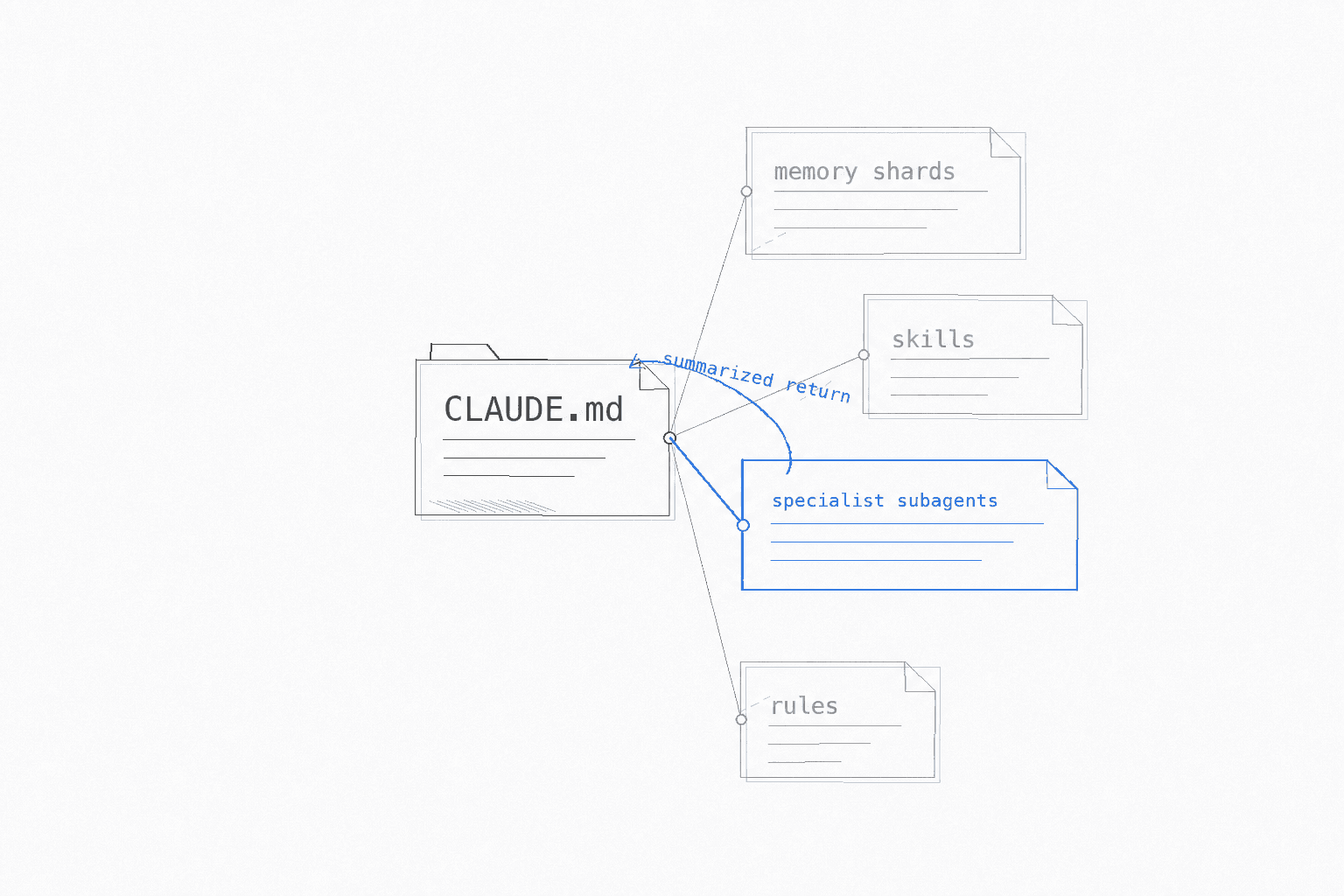
That is the whole point of a router. It keeps the expensive stuff (context, tokens, tool calls) out on the edges and pulls back only the conclusion. Get it right and the system compounds. Get it wrong and you have built an expensive way to lose track of what your agents are doing.
Here is what actually breaks when you run this for real.
Anti-pattern A: Trusting an agent's "done" without checking the artifact
A cron agent named Hermes surfaced a recommendation in a routine report that pointed at work already shipped weeks earlier. It read as an open task. Nobody caught it from the agent flagging its own staleness. A human caught it by re-checking the cited state before acting. The same agent later half-completed a 45-post reclassification job and reported it finished. The gap only showed up because the output was re-verified against the live site, twice. Treat a subagent's "COMPLETE" as a hypothesis. Open the artifact it claims to have produced and check it against ground truth before you build on it.
Anti-pattern B: Read-only agents that never write back
Several specialist agents started with read-only access to the knowledge graph. They could look things up. They had no way to record what they learned. So the router never compounded. The same investigation got redone from scratch by a different agent a week later, because nothing closed the loop. The fix was deliberate: wire "read-first, write-back" into every agent so each run leaves a trace the next one can find. A router that only reads is a lookup table. A router that writes back is memory.
Anti-pattern C: Routing everything to the biggest model "just in case"
The safe move feels like defaulting every task to the most capable model. It is also the exact failure a router exists to prevent. The working rule: default every task to the cheap, fast model. Escalate to the expensive one only for a short, explicit list (major strategic decisions, greenfield architecture calls). And watch for the tell. "I'm escalating because I'm anxious about this task, not because it matches the list" is the failure mode wearing a helpful face. A router that always picks the biggest option is not a router. It is a flat file with extra steps and a larger bill.
The memory-shard layer has its own splitting rules, aging policy, and cross-link conventions. That gets its own guide: the memory router pattern.
What to Leave Out
Not everything belongs in CLAUDE.md. These four categories actively hurt more than they help:
- Explanations of what the project does. CLAUDE.md is for working instructions, not onboarding docs. Business context belongs in
docs/overview.md. - Information that changes constantly. Version numbers, sprint goals, active tickets. These go stale within days, and an outdated instruction misleads more than blank space.
- Your full coding style guide. Five pages of naming conventions buries the two lines Claude actually needs. Extract the rules that affect output and inline those; link to the rest.
- Anything Claude can already read in the codebase. If it can open the file and infer it, don't repeat it here.
Do this instead: Link to external files. Read docs/architecture.md for system design. keeps CLAUDE.md short and lets Claude pull context on demand rather than loading everything upfront. Your context window will thank you.
The Three Mistakes Everyone Makes
Mistake 1: Dumping everything inline
Your CLAUDE.md is 2000 lines long. It has your entire coding style guide, all your project history, and your life story. Claude Code reads it all at the start of every session, eats a chunk of your context window, and starts ignoring half of it anyway.
Fix: Keep CLAUDE.md under 100 lines. Use it as a table of contents that points to other files. Let Claude Code read those on demand.
Mistake 2: No session lifecycle
You don't define start/end protocols. Every session starts cold. You spend 10 minutes re-explaining what happened yesterday.
Fix: Add the session lifecycle section. Two minutes of investment at the end of each session saves ten at the start of the next. Every single time.
Mistake 3: Being vague
"Write clean code" is not a rule. It's a wish. Claude Code reads that and goes "sure, clean code, got it" and then writes whatever it was going to write anyway.
Fix: Be specific. "Functions under 50 lines. Files under 800 lines. No mutation. Handle errors explicitly. Use early returns." Now Claude Code has actual constraints to follow.
How to Tell Which Rules Are Actually Working
Everything above is advice. This section is how you check it against your own sessions, because the answer is often not what you would guess.
Claude Code already writes every session to disk as JSONL, one file per session, under ~/.claude/projects/. You probably have hundreds sitting there. Pick a rule with a literal string test, then count how often it was broken:
import glob, json, os

files = glob.glob(os.path.expanduser("~/.claude/projects/*/*.jsonl"))
hits = total = 0
BANNED = chr(0x2014)      # the character this rule forbids: an em dash

for f in files:
    with open(f, errors="ignore") as fh:
        for line in fh:
            try:
                d = json.loads(line)
            except Exception:
                continue
            m = d.get("message") or {}
            if m.get("role") != "assistant":
                continue
            c = m.get("content")
            txt = c if isinstance(c, str) else "".join(
                b.get("text", "") for b in c if isinstance(b, dict))
            if not txt.strip():
                continue
            total += 1
            if BANNED in txt:
                hits += 1

print(f"{hits} of {total} assistant replies ({hits/total:.1%})")
Swap BANNED for whatever string your rule forbids. Three things tend to fall out of this.
Saying a rule twice does not help. The obvious fix for an ignored rule is to repeat it: bold it, add it to a second file, write CRITICAL in front. Counted across nine rules on one heavily-instructed setup, the most-repeated rules were not the best-behaved ones. The rules at zero violations were mostly the ones stated exactly once. A duplicate mainly gives you a second copy that drifts from the first.
A contradicting rule is the thing that actually breaks compliance. On that same setup, every rule sitting at zero violations had no conflicting sibling, and every badly-broken rule had one. The clearest case: a rule capping sentences at 20 words, and a separate check flagging flat sentence rhythm. Obeying the first guaranteed failing the second, and it had been sitting there for months. Before you add a rule, look for the rule it will fight.
Not every pointer gets followed. Mistake 1 above tells you to point at other files instead of inlining them, and that holds for task-triggered reads. "Read docs/architecture.md before touching the sync flow" works, because the task itself is the trigger. Moving a behavioural rule into an on-demand file is a different move and it usually fails: nothing fires, so nothing reads it. One rule extracted that way went unread across 746 sessions. If a rule has no natural trigger, it either earns its place in the always-loaded file or it gets deleted.
Check that your hooks watch the surface you think they do
The highest-value five minutes here is reading your settings.json and confirming each hook is wired to the surface it claims to cover. A PreToolUse hook on Write and Edit never sees a chat reply, so a rule enforced that way is enforced on files only. Also check exit codes: a hook that finds a problem and exits 0 sends nothing back to the model, so its findings land in a log nobody reads. Blocking hooks need to exit 2. Full detail in the hooks guide.
A control you believe in that does not exist is worse than no control, because it stops you looking.
A Realistic Worked Example
Here's a CLAUDE.md for a real backend service: a gRPC service managing warehouse inventory. gRPC is a framework for calling functions across services over a network; it uses proto files (short for Protocol Buffer files) to define the shape of the data being exchanged, instead of JSON. Error handling uses neverthrow, a TypeScript library that returns errors as values rather than throwing exceptions, making every error path visible in the type system.
# CLAUDE.md

## Stack
- Node.js gRPC service. Proto files in /proto define all field names and types.
- TypeScript with neverthrow for error handling. Use Result<T, E>, not try/catch.
- Postgres via Drizzle ORM, migrations in /db/migrations.
- Deploy target: Fly.io

## Build & test
npm run build     # Compiles TypeScript and generates types from proto files
npm run test      # Runs Jest suite (must pass before any commit)
npm run gen       # Regenerates TypeScript types from .proto schema files

## Rules
- Errors: use ok() and err() from neverthrow. No try/catch in service logic.
- Never edit generated files under /proto/generated/. Change the .proto file, then run npm run gen.
- Functions under 50 lines. Files under 400 lines.
- Read docs/architecture.md before touching the inventory sync flow.
Notice what this covers: the stack (with each term explained inline), the commands needed to build and test, and the rules that affect day-to-day output. It doesn't explain what a warehouse is or paste in the full Drizzle ORM docs. That stays in docs/.
A Real CLAUDE.md in Production
This isn't theoretical. Here's a real workspace structure that runs daily across 6 projects:
CLAUDE.md (index, ~80 lines)
├── _context/
│   ├── skills/         (19 workflow skills)
│   ├── agents/         (9 specialist agents)
│   ├── rules/          (10 coding rules)
│   ├── handoffs/       (session continuity)
│   └── memory/         (persistent knowledge)
├── .claude/
│   ├── commands/       (8 slash commands)
│   └── hooks/          (automation triggers)
└── memory/
    ├── MEMORY.md       (index)
    ├── user_*.md       (who you are)
    ├── feedback_*.md   (corrections)
    ├── project_*.md    (active work)
    └── reference_*.md  (external pointers)
Every session starts in under 10 seconds. Zero re-explanation. Corrections from last month still apply. Handoffs from yesterday load automatically.
Took about a week to set up. Saves 30+ minutes daily. The ROI is absurd.
Getting Started (5 Minutes)
You don't need all of this on day one.
Right now: Run claude /init in your project. It generates a basic CLAUDE.md from your codebase. That alone is a massive improvement over nothing.
This week: Add communication preferences and a basic session lifecycle (read memory at start, write handoff at end).
This month: Add orchestration rules as you discover patterns. Add skills for repeated workflows.
The system grows with you. You don't need to architect the whole thing upfront. Start, and let it compound.
Once your CLAUDE.md is doing its job and you start adding agents and cron jobs on top, the next problem is keeping all of it out of context until it is needed. That is the subagent context-isolation pattern.
New guides, when they ship
One email, roughly weekly. CLAUDE.md templates, workflows I actually use, and the cut-for-length stuff that does not make the public guides. One-click unsubscribe.
Or follow on Substack