Frameworks
5C Loop for Operations
The 5C Loop applied to operations work: exception reports, SOPs, vendor communication, process documentation, and the eight use cases where operations professionals see the biggest return.
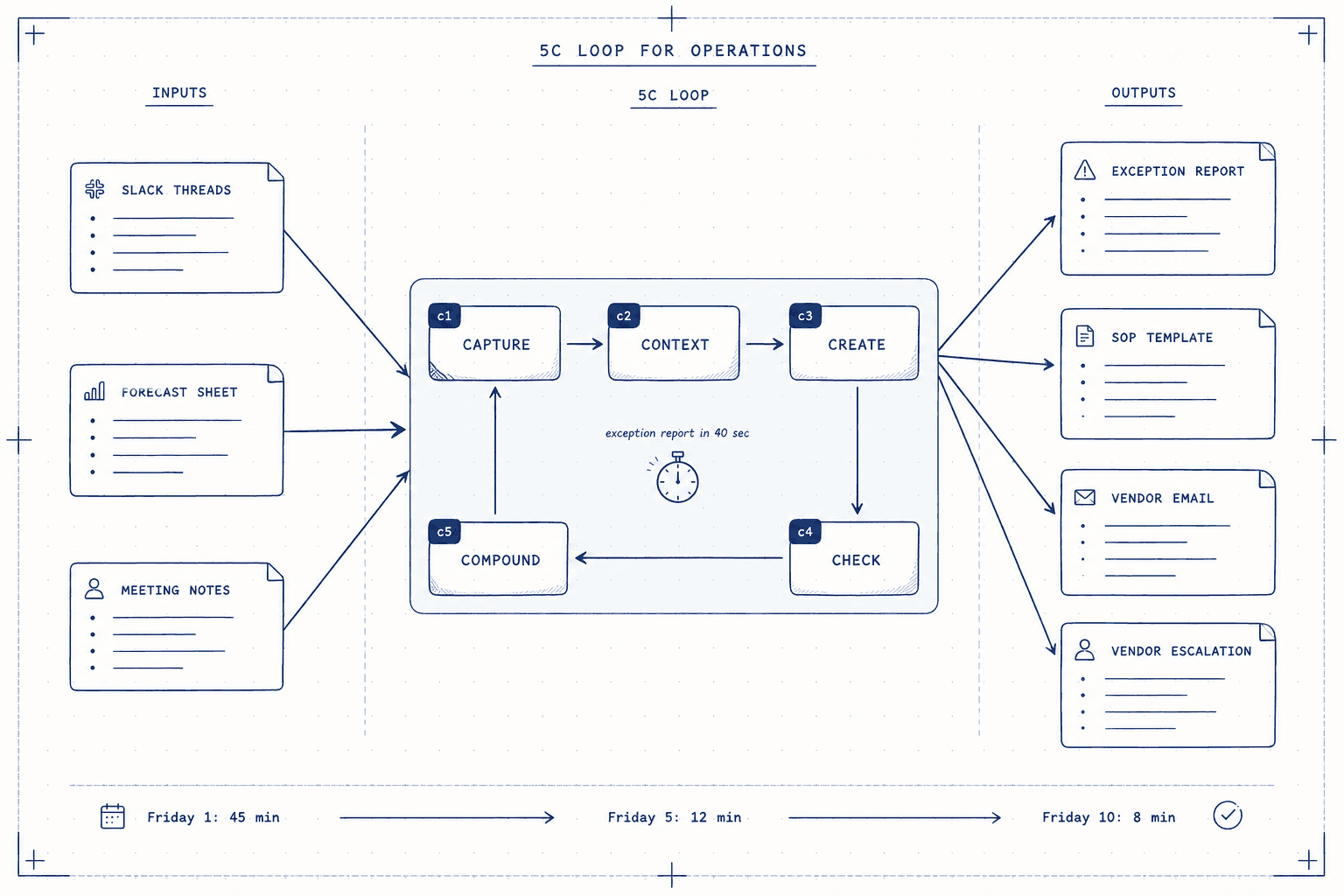
Operations work is documentation work. SOPs, exception reports, status updates, vendor correspondence, process reviews, onboarding materials. The volume is relentless and the stakes are high: a poorly written SOP gets followed wrong. An imprecise exception report buries the thing your VP needs to see.
The 5C Loop works especially well for operations because operations work is structurally repeatable. You write the same categories of document every week. Once you run the loop on a task type once, every subsequent run is faster.
This page is the operations spoke of the 5C Loop framework. If you have not read the pillar page, start there. This page assumes you know the five steps.
The 5C Loop in operations language
The same five steps, translated for how operations work actually flows.
Capture: Pull the raw data. Meeting notes, Slack threads, dashboards, the email chain, the spreadsheet. If the report is about a problem, include the original ticket. If it is about a vendor, include the last two email exchanges. Give Claude the actual evidence, not your summary of it.
Context: Operations outputs almost always have a known reader with a known anxiety. Your VP reads the Friday exception report worried about Monday. Your new hire reads the onboarding doc worried about making a mistake. Name that reader and that anxiety explicitly. Also name the format: length, structure, level of detail.
Create: Let Claude produce the full draft before you edit. For operations work, Claude handles structure, completeness, and professional language faster than most people can type. Your job is direction, not typing.
Check: Operations check priorities are specific. Factual accuracy first (Claude cannot know that a ticket was escalated at 3pm yesterday). Political sensitivity second (what sounds like a simple risk flag might have stakeholder history behind it). Then clarity: would a reader new to this situation understand what action is needed?
Compound: Operations has the most to gain from Compound because the task types recur. After running the loop on your Friday exception report, save the Context block as a template. After writing a good SOP, save the structure. After a strong vendor escalation email, save the tone and framing. Your library builds itself.
Eight use cases, with prompts
1. Exception reports
The weekly exception report is the highest-leverage starting point. Most organizations produce them late, in a rush, in a format that buries the things that matter.
## CAPTURE

[paste: metrics from this period, incidents/exceptions that occurred,
resolution status for each, owner names]

## CONTEXT

Reader: [VP/Director name]. They will read this Friday afternoon before
the weekend. They need to know what requires their attention vs what is
handled. Format: one-paragraph executive summary, then max five issues
each with: Issue / Status / Owner / Next step. Plain language. No jargon.
One page maximum.

## CREATE

Write the exception report based on the above.
2. Standard Operating Procedures
Writing a new SOP from scratch is one of the slowest tasks in operations. Running it from a 30-minute voice memo is much faster.
## CAPTURE

[paste: voice transcript, meeting notes, or a rough description of the
process steps in whatever order they came to you]

## CONTEXT

Reader: a new team member with no prior experience in this role. They
will follow this document without asking questions. Format: numbered
steps. Each step has: action, who does it, what tool or system they use,
what a correct outcome looks like. Flag any steps where a mistake is
irreversible.

## CREATE

Write the SOP based on the above.
SOP check priority
Always verify role names, system names, and system versions. Claude will use whatever names you gave it in Capture. If your org renamed a system or a team, catch that in Check before distributing.
3. Vendor escalation emails
The vendor is three weeks late. You need to escalate without burning the relationship.
## CAPTURE

[paste: original contract terms, the timeline of delays, the most recent
communication, what the impact is on your side]

## CONTEXT

Reader: the vendor account manager. Goal: get a committed revised date
in writing, preserve the working relationship, make clear this has
internal consequences for us. Tone: professional and firm, not
confrontational. Length: short. Three paragraphs maximum.

## CREATE

Write the escalation email.
4. Process change communication
A process is changing. You need to tell the people affected without triggering resistance.
## CAPTURE

[paste: what the old process was, what the new process is, why the
change was made, timeline for implementation, who is affected]

## CONTEXT

Reader: [team or function]. They will want to know: does this affect my
day-to-day, why is this happening, and what do I need to do right now.
Format: a short announcement email with a clear subject line, a brief
reason for the change, the key differences from current process, and
one clear action item for the reader.

## CREATE

Write the process change communication.
5. Monthly operational review
The monthly ops review goes to leadership. It needs to be both honest and confident.
## CAPTURE

[paste: metrics for the month vs target, what drove variance, initiatives
in progress, any risks that need flagging, wins worth highlighting]

## CONTEXT

Reader: leadership team. They are looking for: are we on track, what
needs their input, what is going well. Format: brief summary paragraph,
then four sections: Performance vs Plan, Root Cause of Variance, In
Progress, and Risks and Requests. Executive prose, not bullet points.

## CREATE

Write the monthly operational review narrative.
6. Onboarding documentation
Good onboarding docs are rare because writing them takes longer than just training someone. The 5C Loop speeds this up significantly.
## CAPTURE

[paste: your existing notes or rough outline, any existing docs you are
updating, specific gotchas or things that trip up new people]

## CONTEXT

Reader: new team member, starting their second week. They are confident
but need specificity. Format: day-by-day or task-by-task structure. For
each section: what to do, how to do it (step by step), what good looks
like, and who to ask if stuck. Friendly but precise tone.

## CREATE

Write the onboarding documentation.
7. Post-incident report
Something went wrong. You need to document it before the details blur.
## CAPTURE

[paste: timeline of events, what the impact was, what caused it,
what was done to resolve it, who was involved]

## CONTEXT

Reader: team and leadership. Purpose: learning, not blame. Format:
timeline section, impact section, root cause analysis (5 Whys format),
corrective actions with owners and dates, and a short "what went well"
section. Neutral tone throughout.

## CREATE

Write the post-incident report.
8. Budget variance narrative
The numbers do not match the plan. You need to explain why in a way that maintains confidence.
## CAPTURE

[paste: budget vs actuals table, the reasons for each major variance,
any mitigating factors or plans to recover]

## CONTEXT

Reader: Finance and your VP. They will look for: is this under control,
is the forecast still valid. Format: one paragraph of overall summary,
then variance explanations grouped as: one-time items (not repeating),
timing differences (shifting, not lost), and structural gaps (need
management action). Confident tone, no hedging.

## CREATE

Write the budget variance narrative.
The compound value for operations specifically
Operations professionals have a structural advantage with the Compound step: the tasks recur weekly, monthly, quarterly, and annually. The investment you make in saving a Context block or a prompt template has high frequency of return.
After running each of the eight use cases above, save the Context block to your CLAUDE.md. Within two months, most of your regular ops outputs will have saved context, which means C2 costs you nothing and C1 is mostly copy-paste. Your actual work shifts to C4: reading carefully, being the human who knows the political and factual nuances that Claude cannot.
That is the real return. Not faster typing. A shift in where your cognitive load actually sits.
What the Check step means for operations work
Operations work has specific check priorities that differ from other domains.
Factual accuracy is first. Claude produces outputs based on what you gave it in Capture. If a ticket status changed after your notes were taken, Claude cannot know that. Read every status, every date, every owner name before anything leaves your hands.
Sensitive framing is second. Some operational problems have history behind them. A vendor delay might be the third in a row with the same supplier. A budget variance might be related to a headcount freeze that is not public. You know the context that gives a fact its weight. Claude does not.
Action clarity is third. Operations outputs that reach leadership or cross-functional teams need to make the required action obvious. If someone has to read your exception report twice to figure out what you need from them, the report has failed. Check that every issue has a clear next step with an owner.
Where to go next
The pillar page has the full framework and the loop logic: The 5C Loop.
If you are new to Claude Code and still setting up your workspace, the Foundations section covers the basics before you get into task-specific use.
Operations teams doing this work at scale should also read the Memory System guide, since the Compound step depends on having a working memory setup.
New guides, when they ship
One email, roughly weekly. CLAUDE.md templates, workflows I actually use, and the cut-for-length stuff that does not make the public guides. One-click unsubscribe.
Or follow on Substack