Frameworks
5C Loop for Teachers
The 5C Loop applied to teaching work: lesson plans, rubrics, student feedback, parent communication, and the eight classroom documents where educators see the biggest return.
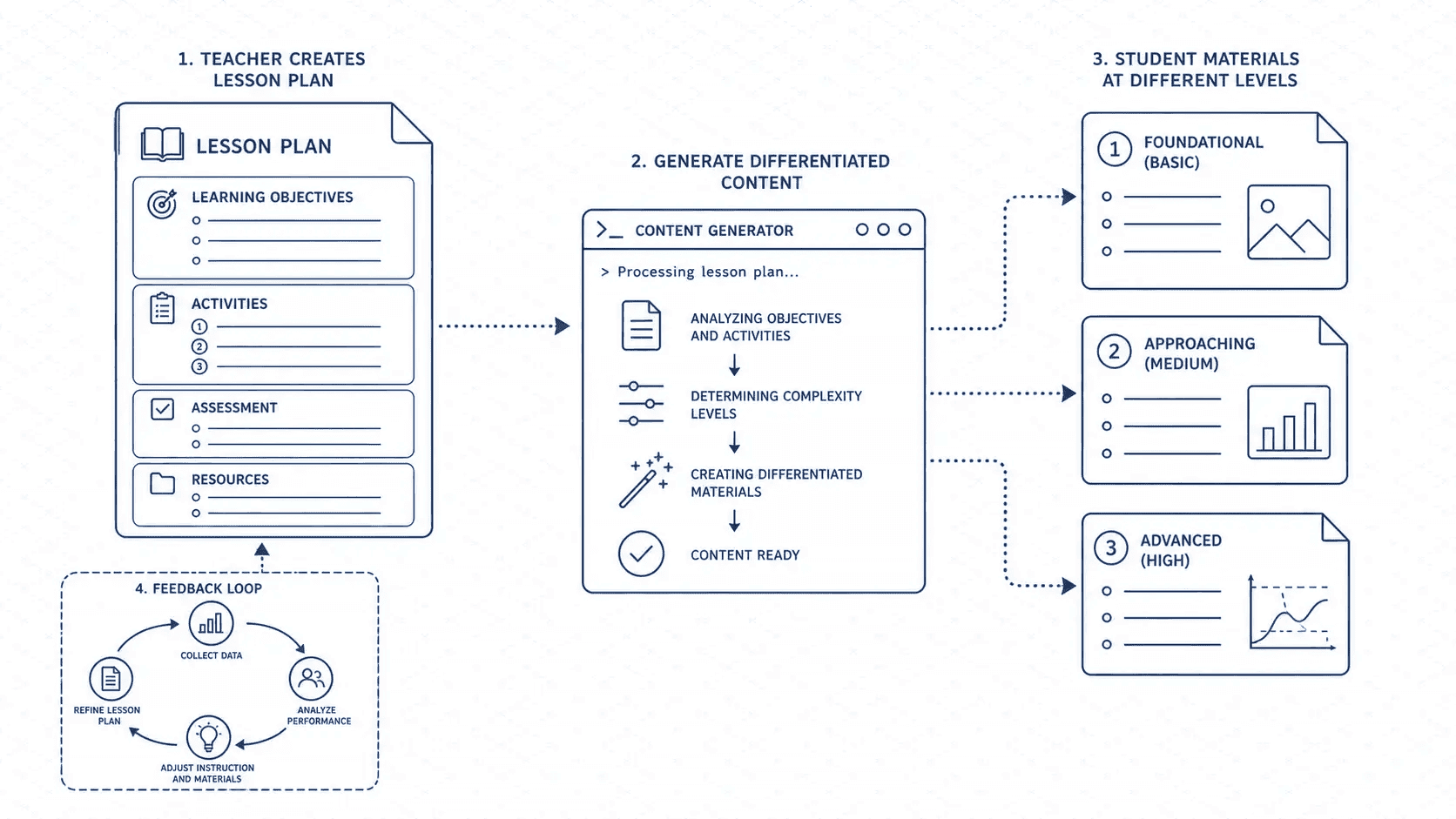
Teaching is documentation work. Lesson plans, rubrics, student feedback, parent emails, differentiation plans, assessment design, curriculum maps. The volume is relentless. The stakes are real: a vague rubric produces inconsistent grading. A poorly written parent update damages trust. A lesson plan that does not account for your specific class falls apart by period two.
The 5C Loop works especially well for teachers because teaching documents follow repeatable structures. A lesson plan for Tuesday looks structurally like a lesson plan for Thursday. Once you run the loop on a document type once, every subsequent version is faster. Your energy shifts from construction to judgment.
This page is the teaching spoke of the 5C Loop framework. If you have not read the pillar page, start there. This page assumes you know the five steps.
The 5C Loop in teacher language
The same five steps, translated for how teaching work actually flows.
Capture: Pull the raw material. The standard or learning objective you are targeting, notes from last time you taught this topic, the diagnostic data from last week's exit ticket, any resources or readings you plan to use, notes about specific students who need differentiation. Do not describe these things to Claude — paste the actual content. A standard written out verbatim is more useful than a paraphrase of it.
Context: Teaching documents always have a known reader with a known need. Your lesson plan is read by you — at 7am before first period. Your rubric is read by students who have never seen the assignment. Your parent update is read by a guardian who is worried and has limited time. Name the reader. Name their state of mind. Claude will write to that specific person rather than a generic audience.
Create: Let Claude produce the full draft. For teaching work, Claude handles structure, sequencing, and language scaffolding faster than most educators can type from scratch. Your comparative advantage is what Claude cannot access: the specific kid who will struggle with step three, the fact that your class gets restless after 20 minutes of instruction, the running joke that makes a hard topic approachable. Let Claude build the scaffold. You decide what fits your room.
Check: Teaching check priorities are specific. Accuracy first — Claude can make factual errors in subject-matter content, especially in science, math, and history. Read every factual claim before distributing anything to students or parents. Differentiation second — Claude will produce a one-size draft unless you told it otherwise. Check whether your students who need it are actually served. Tone third — parent communication in particular is easily misread. Check the warmth and the register.
Compound: Teaching has unusually high recurrence. You teach the same standards across years. Rubrics for essay writing reuse across units. Parent communication templates repeat across the year. After running the loop on any recurring document type, save the Context block. Your library builds semester over semester. By year two, most of your recurring documents start with C2 already done.
Eight use cases, with prompts
1. Lesson plan
A full lesson plan in minutes, tuned to your class and your standard.
## CAPTURE

[paste: the learning objective or standard (verbatim), grade level, subject,
class size, how long the period is, any diagnostic notes about where
students currently are, resources or readings you plan to use]

## CONTEXT

Reader: me, reading this at 7am before I teach. I need it to be usable
without a lot of re-reading. Format: learning objective, warm-up (5 min),
direct instruction (15 min), guided practice (15 min), independent work
(10 min), exit ticket (5 min). Include what I say during transitions. Flag
any step that commonly loses students' attention.

## CREATE

Write the lesson plan.
2. Rubric
A rubric students can actually use to improve their work before submitting.
## CAPTURE

[paste: the assignment prompt or task description, the learning objectives
it is assessing, the grade level, any prior rubrics from this class if you
want to maintain consistent language]

## CONTEXT

Reader: students, reading this before and during the assignment. They need
to understand what good looks like, not just what bad looks like. Format:
four performance levels (Exceeds / Meets / Approaching / Beginning) across
4-5 criteria. Write each cell in plain language a student can self-assess
against. No jargon.

## CREATE

Write the rubric.
3. Student feedback
Specific, actionable written feedback that actually changes what a student does next.
## CAPTURE

[paste: the assignment prompt, the rubric used to assess it, verbatim
notes on this student's specific work — what they did well, where they
fell short, what the next step is]

## CONTEXT

Reader: the student, reading this after getting their grade back. They are
either relieved or disappointed. Either way, they need to know specifically
what to do differently next time. Format: start with what was genuinely
strong (specific, not generic praise). Then one or two specific things to
improve, with a concrete example of what that improvement would look like.
End with one action to take on the next assignment. Warm but direct tone.

## CREATE

Write the student feedback.
4. Parent communication
An update that builds trust rather than triggering anxiety.
## CAPTURE

[paste: what you need to communicate (concern, progress update, upcoming
event, behavioral issue), any relevant context (what has already been tried,
what the student's pattern has been, what the ask is)]

## CONTEXT

Reader: a parent or guardian reading this on their phone, probably between
meetings. They are immediately reading for whether to be worried. Format:
start with one clear sentence of context (not a hedge). State the situation
plainly. Say what you have already tried or noticed. State what you would
like from them. End with an offer to talk if helpful. Warm, collaborative
tone. No jargon, no bureaucratic language.

## CREATE

Write the parent communication.
5. Differentiation plan
Making the same lesson work for students at different levels, without five separate lesson plans.
## CAPTURE

[paste: the core lesson or task, the learning objective, notes on the
specific students who need differentiation (where they are, what the gap
is, any accommodations or IEP notes that apply)]

## CONTEXT

Reader: me, preparing modifications before the lesson. I need concrete
changes I can actually implement — not general advice about scaffolding.
Format: for each student or group who needs differentiation, list: what
the modification is, what it looks like in practice, what I watch for to
know it is working. Keep it concise — I need to be able to scan this during
class.

## CREATE

Write the differentiation plan.
6. Assessment design
A quiz, test, or project brief that actually measures what you taught.
## CAPTURE

[paste: the standards or objectives being assessed, what was taught in
this unit (key concepts, vocabulary, skills), the format you want
(multiple choice, short answer, essay, project), any specific question
types or topics you want to include]

## CONTEXT

Reader: students taking the assessment. It needs to be clear enough that
a student who learned the material can demonstrate it, and clear enough
that confusion does not mask what they actually know. Format: [whatever
format you specified]. Include an answer key or scoring guide at the end.
Flag any question where the wording could be ambiguous.

## CREATE

Write the assessment.
7. Unit overview for students
The document students read on day one that orients them to the whole unit.
## CAPTURE

[paste: the unit topic, key standards or skills being developed, the major
assignments, the timeline, any essential questions the unit is organized
around]

## CONTEXT

Reader: students, on the first day of the unit. They want to know: what is
this about, what do I have to do, how will I be graded, and why should I
care. Format: essential question (one compelling sentence), what we will
learn and why it matters, major assignments with due dates, how grades will
be calculated. Engaging language — this is the pitch, not the syllabus.

## CREATE

Write the unit overview.
8. Curriculum mapping note
The notes you send to your department head or curriculum coordinator.
## CAPTURE

[paste: the units you taught this year, the standards each unit addressed,
what worked well, what fell flat and why, what you would change next year,
any pacing issues or gaps you noticed]

## CONTEXT

Reader: curriculum coordinator or department head, using this for next
year's planning. They want to know: where are the gaps, what needs
adjustment, what is working and should be protected. Format: unit-by-unit
summary, then a section on what to keep and what to revise, then specific
recommendations for next year. Professional, specific, no hedging.

## CREATE

Write the curriculum mapping notes.
Fact-check subject content
Claude can make factual errors in specific subject-matter content — especially in science, history, and math. Always read any content that will be distributed to students or parents for factual accuracy. The structure and language will be good; the facts need your verification.
The compound value for teachers specifically
Teachers have unusually high recurrence in their documentation work. You teach the same standards across multiple years. Essay rubrics reuse across units. The parent email for a missed assignment follows the same structure every time.
The investment is once: run the loop carefully on a document type, save the Context block to your CLAUDE.md. The return is every subsequent instance of that document type. A lesson plan that took 45 minutes the first time takes 10 minutes the fifth time. The time that frees up goes where it should — toward the students in front of you, not the documents about them.
By the end of a school year, most of your recurring documents — lesson plans for familiar standards, rubric variations, exit ticket prompts, parent updates — will have saved Context blocks. You open Claude, paste the raw material, and spend your energy on C4: the moment where your professional judgment about your specific students makes the document actually good.
What the Check step means for teaching work
Factual accuracy is first. This is non-negotiable. Claude can produce a lesson plan that is structurally excellent and contains a factual error in the content. Before anything goes to students, read every claim for accuracy. Do not let the quality of the structure make you trust the facts.
Differentiation fit is second. Claude will write for a generic student unless you told it otherwise. Read the draft through the lens of your specific students who struggle, your English language learners, your advanced students who need extension. The differentiation section often needs the most revision — Claude cannot know the specific gap for the specific kid.
Tone is third — especially for parent communication. Parent emails are easily misread. Claude defaults to professional language that can feel cold or alarming when the topic is sensitive. Read parent communication out loud before sending. Does it sound like you? Does it invite collaboration rather than create defensiveness?
Where to go next
The pillar page has the full framework and loop logic: The 5C Loop.
If you are setting up Claude Code for the first time, the Foundations section covers installation and basics.
Teachers doing this across a full department should also look at the Memory System guide — the Compound step only works if your Context blocks persist, and the memory system is how you make that happen.
New guides, when they ship
One email, roughly weekly. CLAUDE.md templates, workflows I actually use, and the cut-for-length stuff that does not make the public guides. One-click unsubscribe.
Or follow on Substack